Movement to OpenCl++

In my project, I have been thinking about something, data-oriented-design, quite a lot during the creation of new code. I’m going to present some of these concepts in current implementation and then describe moving to a specifically DOD language, opencl++. Moving into OpenCl++ seems like a natural extention of DOD C++ I use.

So, in C++, a simple Data-Oriented technology is as follows:

std::for_each( std::execution::par, container.begin(), container.end(), [&,front = &container.front()](auto& item) {

			std::size_t idx = &item- front;

            //item = container[idx];
            item = x; // some algorithm
            someOtherContainer[idx] = // some algorithm
            
});

Basically, we have vector of items, which are going to be iterated over and can be easily synchronized with mutexes or other mechanisms, and in some hardware parallel fashion. For each item in the container, often, that item is also associated with other containers, such that you can use idx to access a variety of information in various containers.

When containers are vectors then they could even be further optimized, potentially, by SIMD code. This could also be ran instead as std::seq to perform better in some circumstance or during debuging.

Heading in the direction of SIMD, I have done before fairly successfully, I think. However, since I am seeking parallel-power to test, I want processors other than CPU, potentially, like GPU or some super-computer. I’m pretty sure the std::par is not attempting to use gpu or other hardware, at least, or the moment it doesn’t. Therefore, I think learning and implementing OpenCL++ is the next step toward a good process.

OpenCL is a standard language for operating in a parallel fashion, on a variety of types of processing platforms, such as GPU or CPU. It is developed and maintained by Khronos Group so I expect it to be an excellent product. It is based on a set of C and there is also a C++ version which I intend to explore.

Studying OpenCL++, so far, I have had to compile three libraries and also install ruby. In the source sdk there are examples which I proceed into. The first example compiles but then crashes at runtime with a specific error code. This is apparently due to an open issue which is on their forums, where I also found a solution, and it has been an open ticket since 2021.

Implementing the solution, it seems to work just fine, though – it is particularly concerning if that is the correct solution or not – because it appears to not be. But it does work in some circimstance.

The C++ written is modern and pretty interesting, and I am just still learning about it. I have encoutered several interesting code features so far…

Some lines of C++ code:

setArgs<index + 1, T1s...>(std::forward<T1s>(t1s)...);
std::vector<int, cl::SVMAllocator<int, cl::SVMTraitCoarse<>>> output2(numElements / 2, 0xdeadbeef);

Some lines of OpenCl++ code:

"output[get_global_id(0)] = inputA[get_global_id(0)] + inputB[get_global_id(0)] + val + *(aNum->bar);"
       "  enqueue_kernel(childQueue, CLK_ENQUEUE_FLAGS_WAIT_KERNEL, ndrange, "
        "    ^{"
        "      output[get_global_size(0)*3 + get_global_id(0)] = inputA[get_global_size(0)*3 + get_global_id(0)] + inputB[get_global_size(0)*3 + get_global_id(0)] + globalA + 2;"
        "    });"

Until next time!
Backpropagation is a class of random search algorithms

This is evident when watching networks learn using my visualisation program. The backpropagation algorithm creates spontaneous types of patterns which are put into or scuplted into the network briefely or for some period, and then there is a random shift to a new concept with a new pattern for its own breifity. This process repeats until there is a clear learned functon, at which point the random search abrubtly ends. These series of processes generate animations that are explsions of movement in particular directions and angles, composed of various lines and shapes. They are common among the entire landscape of the network and working in apparent unison, therefore making their appearence and trendy behaviour obvious. I’m going to be posting more videos.

Visualizing network training

Here is a video of where my project is at,

Basically, it provides a graphical visualization of the network weights. I am going to experiment with generating and examining this sort of image through training. In this video, the network is training on six problems, and it slowly learns for about 45 seconds. After that, its learning skyrockets for brief amount of seconds. What if I had decided to stop training before 45 seconds? Seems problematic.

You can see in this image, the network is 11 pixels high, input and output rows and then 9 hidden layers. There are obvious horizontal and vertical lines and some occuring types of shapes, and lots of movement. The width of the hidden layers in the network are 100 pixels. The total image of the network is 11×100 pixels, and the network itself is 3x9x10x3 in shape.

Intelligent sequences of numbers

Since a large property of a neural network is indeed its initial or current random state, maybe we can consider this entire state as just a vector of randomly generated values. In reality, that’s what it is on the computer. Each of these values is generated via a random number generator in a specific sequence. A question that I want to examine is whether or not the nature of the random number generator effects a network’s capacity to learn. I’m going to write a series of random number generators and see if they affect learning capacity in some way. One generator I would like to make or find, which I have only just thought up, is a pi digit generator, where each new digit represents a random number. The idea is that maybe instead of always doing back propagation, and trial and error, maybe there is a way to generate intelligent network initial random state via specific random number initialization. I think, each digit of pi can be viewed as a random number since it is non-repeating, and given any series of values, and random, I think, if you don’t consider the digit where you started counting. At the same time, the initial or starting digit of pie is the random seed which can be use deterministically. Do random number generators affect network intelligence? Where does this go? We will see, maybe.

Configurations of random variables

In my neural network program, I refactored some code and produced an error which I did not notice for some time. When I would run the program, eventually, out of 100 networks, a single or few networks would learn the pathing problem. With no difference in how they are trained, they are all taught exactly the same way – and with a bug, too. All taught the same, but the results range from correct to odd, the differnence in training success is enormous. The only difference between these networks is their initial random configuration. The initial state of the network’s weights and biases, which are produced through some random number generation sequence.

Ok, onto the bug in code. I had a function which for some reason changed through error into merely:

LEARN_RATE = cos(trainNum)

This causes the learn rate to vary by cos function from -1 to 1. When learn rate is above zero, a correction is made toward the correct solution, and when it is below zero, a correction is made away from the correct solution. With all networks trained exactly the same way, sometimes learning, sometimes unlearning, maybe 1% learn in a reasonable amount of time.

What does this all mean, unlearning and learning, I don’t know! But I think it may show the profoundness of Lottery Ticket. It seems to boil down to “configurations of random variables” being an important part in learning capacity and ultimately problem solving capacity.

Writing custom Random Number Generators and performance Comparisions

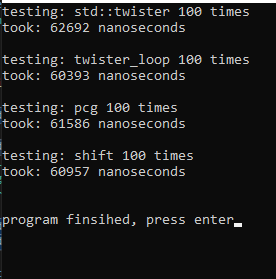
For some reason, I became concerned about the amount of time being spent by random number generators, so I took a look into them. I wrote a program which compares the speed of std::mt19937 ( mersenne twister ), a custom “twister loop”, a custom “pcg”, and custom “xorshift” generators. The standard twister was the slowest, though I’m unsure if it matters since they’re all quite fast. The fastest turned out to be my “twister loop”, though, this is also the least random, and it’s barely the fastest.

This code shows how to write a custom random number generator that can be used with std functions such as shuffle and distributions. Here are the results, followed by the code.

It turns out that std::twister is pretty fast compared to the custom “faster” generators I discovered online. The fastest generator, twister_loop, is just an array filled with twister values being referenced rather than an actual generator.

Here is the code:


#include <random>
#include <iostream>
#include <chrono>


class TwisterLoop{
public:
	using result_type = uint32_t;
	static constexpr result_type(min)() { return 0; }
	static constexpr result_type(max)() { return UINT32_MAX; }
//
	std::mt19937 mTwister;

	std::size_t mCurrentIdx{ 0 };
	std::vector< result_type > mValues;

	result_type generateOne() {
		return  mTwister();
	}

	void refreshLoop() {

		std::generate(mValues.begin(), mValues.end(), [&]() {

			return generateOne();
		});
	}

	TwisterLoop(result_type rdseed, std::size_t loopSize=1000){
		seed(rdseed);

		mValues.resize(loopSize);
		refreshLoop();
	}

	void seed(result_type rdseed){
		mTwister.seed(rdseed);
	}

	result_type operator()(){

		if (mCurrentIdx >= mValues.size()) mCurrentIdx = 0;
		return mValues[mCurrentIdx++];
	}

	void discard(unsigned long long n){
		for (unsigned long long i = 0; i < n; ++i)
			operator()();
	}
};


class pcg{
public:
	using result_type = uint32_t;
	static constexpr result_type(min)() { return 0; }
	static constexpr result_type(max)() { return UINT32_MAX; }


	pcg()
		: m_state(0x853c49e6748fea9bULL)
		, m_inc(0xda3e39cb94b95bdbULL)
	{}

	pcg(std::random_device& rd){
		seed(rd);
	}

	void seed(std::random_device& rd){
		uint64_t s0 = uint64_t(rd()) << 31 | uint64_t(rd());
		uint64_t s1 = uint64_t(rd()) << 31 | uint64_t(rd());

		m_state = 0;
		m_inc = (s1 << 1) | 1;
		(void)operator()();
		m_state += s0;
		(void)operator()();
	}

	result_type operator()(){
		uint64_t oldstate = m_state;
		m_state = oldstate * 6364136223846793005ULL + m_inc;
		uint32_t xorshifted = uint32_t(((oldstate >> 18u) ^ oldstate) >> 27u);
		int rot = oldstate >> 59u;
		return (xorshifted >> rot) | (xorshifted << ((-rot) & 31));
	}

	void discard(unsigned long long n){
		for (unsigned long long i = 0; i < n; ++i)
			operator()();
	}
private:
	uint64_t m_state;
	uint64_t m_inc;
};

class xorshift{
public:
	using result_type = uint32_t;
	static constexpr result_type(min)() { return 0; }
	static constexpr result_type(max)() { return UINT32_MAX; }


	xorshift() : m_seed(0xc1f651c67c62c6e0ull) {}
	xorshift(std::random_device& rd){
		seed(rd);
	}

	void seed(std::random_device& rd){
		m_seed = uint64_t(rd()) << 31 | uint64_t(rd());
	}

	result_type operator()(){
		uint64_t result = m_seed * 0xd989bcacc137dcd5ull;
		m_seed ^= m_seed >> 11;
		m_seed ^= m_seed << 31;
		m_seed ^= m_seed >> 18;
		return uint32_t(result >> 32ull);
	}

	void discard(unsigned long long n){
		for (unsigned long long i = 0; i < n; ++i)
			operator()();
	}
private:
	uint64_t m_seed;
};


int main() {

	std::random_device rd;

	std::mt19937 twister(rd());
	TwisterLoop twisterLoop(rd(), 10000);
	pcg pcg1(rd);
	xorshift shift(rd);

	std::uniform_real_distribution<float> reals(-100.0f, 100.0f);
	std::vector<float> results; results.resize(1000);

	auto time = [&](auto& generator) -> std::size_t{
		
		auto start = std::chrono::high_resolution_clock::now();

		std::generate(results.begin(), results.end(), [&]() { return reals(generator); });
		std::shuffle(results.begin(), results.end(), generator);

		auto end = std::chrono::high_resolution_clock::now();

		return std::chrono::duration_cast<std::chrono::nanoseconds>(end - start).count();
	};

	auto test = [&](const std::string& caption, auto& generator) {
		
		std::size_t testCount = 100;
		std::size_t avg = 0;

		std::cout << "testing: " << caption << " " << testCount << " times" << std::endl;
		for (std::size_t i = 0; i < testCount; ++i) {
			avg +=  time(generator);
		}
		avg /= testCount;

		std::cout << "took: " << avg << " nanoseconds" 
			<< std::endl << std::endl;
	};

	test("std::twister", twister );

	test("twister_loop", twisterLoop);

	test("pcg", pcg1);

	test("shift", shift);

	std::cout << "\nprogram finished, press enter";
	std::cin.get();
	std::cin.get();

	return 0;
}

The pcg and xorshift generators are credited to /* Copyright (c) 2018 Arvid Gerstmann. https://gist.github.com/Leandros */

Dumb Neural Networks

Lottery Ticket Theory says that some networks do not train well if at all, based on random properties of the network. In my current project, I have 100 agents, each with their own neural network, same shape. Each of these networks trains exactly the same way, but some end up acting smart and others dumb. This is a pool of just 100 networks.

In this experiment, the agents are trying to path to a given point on the terrain, outlined with a large yellow circle. As I move this circle, agents should change their direction toward the new position. What I do is I select a point, then enter the program into training mode, where all of the agents are training using exactly the same backpropagation ( but not genetics, ATM). Then, I turn off training and see how they behave.

As you can see, a small amount of the networks have failed to learn very well.

Neural Networks and Constants

In my research, it is possible to train a network and have it learn about a constant such as PI, and put it to use in its function. However, if we pass PI in as an input, rather than having to ‘teach’ PI, then training is worlds faster. The network merely learns to use PI rather than derive it and use it simultaneously (though this is possible). It seems like if there are any sort of constants which could be useful to the function, then they should be passed in. Maybe this can be extended to full equations. Rather than the network learning to derive a given equation or function, those definitions can be passed into the network along with constants and other inputs instead. In this way, networks can be ‘educated’.

Brute Force Collision Detection with Data Oriented Design and modern C++.

I have started rewriting my game engine, and I’ve just written a de-collision algorithm for objects. It runs purely through brute-force, using no space-partitioning. In my opinion, this is a good demonstration of what’s possible through DoD and modern C++. The code for the decollision algorithm will be presented at the end, but here is the associated video: ( The black boxes at the begining are lighting issues which resolve shortly)

When the video starts, the 5000 objects are alll intersecting multiple other objects, and they slowly vibrate outward until settling and causing no further collisions.

Normally in a game, you want things to collide as little as possible, using pathing and collision-avoidance methods. When things colliide and intersect, you must undo this and that tends to propagate a wave of decollision through crowds, which is observable in the video. This is the worst-case scenario. In the past, this problem is mitigated using some sort of space-partitioning method to reduce the amount of collision comparisons in addition to avoidance methods. In this example, however, there is no such space partitioning and it is entirely brute-forced using mutlithreading and some Data Oriented concepts.There are further improvements that could be made still to this simple method. The de-collision routine works in real time mostly, and the performance problems in the video have more to do with the 5k lights.

Using a collision-avoidance algorithm of some sort is far more performant than using a dumb decollision algorithm like the one used in this video. That is easy to do, too, since the objects ultimately will be managed by AI and other systems, they should only rarely collide if ever.

The code in the decollision routine is very simple and compares all 5000 objects to all other 5000 objects and modifies their position each time a collision is detected. It is implemented fairly simply using DOD and modern c++. I am going to present this code as a snippit to go with the video but will not describe it much as it is still being developed. The main things that you may notice are the parallel for loops, and in them, looping over *iota (misspelled in code atm) indexes which is a DOD design I’m trying out. I am going to try using a mutex rather than an atomic since atomic seems to be problematic in this algorithm.

void RtsObjectManager::decollide() {

	std::vector< AtomicWrapper<Ogre::Vector2> > collisions; collisions.resize(mObjects.size());

	std::for_each(std::execution::par_unseq, mAtoiIndexes.begin(), mAtoiIndexes.end(), [&](auto& ai) {

		auto& p = mObjects[ai].mPosition;
		collisions[ai]._a = { p.x, p.z };

		});

	std::for_each(std::execution::par_unseq, mAtoiIndexes.begin(), mAtoiIndexes.end(), [&](auto& ai) {

		auto& a = mObjects[ai];

		Ogre::Vector2 ap = collisions[ai]._a.load();
		Ogre::Real ar = a.mTemplate->m2DRadius;

		std::for_each(std::execution::par_unseq, mAtoiIndexes.begin(), mAtoiIndexes.end(), [&](auto& bi) {

			if (ai == bi) return;

			auto& b = mObjects[bi];

			Ogre::Vector2 bp = collisions[bi]._a.load();
			Ogre::Real br = b.mTemplate->m2DRadius;

			Ogre::Real dist = ap.distance(bp);

			if (dist < ar + br) {
				//collision
				//push each away 
				Ogre::Vector2 dir;
				if (dist == 0) {
					dir = { 1.0, 0 };
					dist = 1.0;
				}
				else
					dir = (ap - bp);

				dir.normalise();

				dir *= dist;


				ap.x += dir.x; ap.y += dir.y;
				collisions[ai]._a = ap;

				bp.x -= dir.x; bp.y -= dir.y;
				collisions[bi]._a = bp;
			}
			});
		});

		std::for_each(std::execution::par_unseq, mAtoiIndexes.begin(), mAtoiIndexes.end(), [&](auto& ai) {

			auto& a = mObjects[ai];

			Ogre::Vector2 p = collisions[ai]._a.load() ;
			a.mPosition.x = p.x;
			a.mPosition.z = p.y;

			});
}

C++ Binary Serializer

Binary Serialization can be sort of scary, maybe, to some people. Fortunately, it is super simple, straight forward, and even elegant, in C++. Binary data is the raw representation of information on the computer, and there are easy ways to work with it in C++. The benefits of using Binary are that it can save a lot of space compared to ascii, which will give speed benefits on the computer and accross the network.


Here is an example of ASCII data:

Nick is nearly 40. PI is 3.14159265359

There are two types of data here, text and number. In binary, Text looks like Text. Numbers, however, look quite different.

PI for instance, in binary, looks like the following:

ê.DTû!	@

This is a double and represented by eight bytes or characters. As a float, we get four bytes or characters.

ÛI@

This is considered a non-human readable format and common editors would be hex editors. In a hex editor, the float looks like so:

DB 0F 49 40

OK, onto C++.

There are two simple says to work with Binary in C++. With streams and with strings. To start, we will examine an fstream object.

We open the fstream using the binary and write flags:

class BinaryWriter {

	std::ofstream fout;

public:

	BinaryWriter(const std::string& fileName) {

		fout.open(fileName, std::ofstream::binary | std::ofstream::out);
	}

Next, there is a straight forward templated method for primitives and simple objects:

	template<typename T>
	BinaryWriter& operator<<(const T& data) {

		std::size_t size = sizeof(data);

		for (int i = 0; i < size; ++i) {
			fout.put(reinterpret_cast<const char*>(&data)[i]);
		}
		return *this;
	}

we can overload this method for more complicated or special data types:

	BinaryWriter& operator<<(const std::string& data) {

		fout.write(data.data(), data.size() );

		return *this;
	}

Using these methods is simple and could look like so:

		BinaryWriter bw("out.bin");
		float pi = 3.14159265359;
		bw << pi;
		std::string str("nick");
		bw << str;

The generated binary file looks like so:

ÛI@nick

Normally, when working with ascii files, content tends to be white-space delimited, or null-terminated. In binary, this is not the case, we can have white spaces and null characters anywhere. This means that all fields must be constant in size, the size of the field must be detailed somewhere in the file, or in a file-format.

To read the binary file, we have a straight forward solution:

class BinaryReader {

	std::ifstream fin;
public:

	BinaryReader(const std::string& fileName) {
		fin.open(fileName, std::ifstream::binary | std::ifstream::in );
	}

	~BinaryReader() {
		fin.close();
	}

	bool fail() {
		return fin.fail();
	}

	template<typename T>
	BinaryReader& operator>>( T& data) {

		std::size_t size = sizeof(data);

		for (int i = 0; i < size; ++i) {
			fin.get(reinterpret_cast<char*>(&data)[i]);
		}
		return *this;
	}
	BinaryReader& operator>>(std::string& data) {

		fin.read(data.data(), data.size());

		return *this;
	}

Keeping in mind that in our case the string field is a constant size which is not defined in the file, here is the reading code:

		BinaryReader br("out.bin");
		float pi;
		br >> pi;
		std::string str; str.resize(4);
		br >> str;

This has been an example of working with binary using fstream. Many folks do not realize that you can also store binary data in std::string. std::string is not any sort of c-string, it can store any sort of characters. Unless you call the c_str method, you do not need to work with a c-string.

Here is an example of using std::string with c-str vs binary:

		std::string stra = "\0\0\0b\0e"; //this is a c-str assignment, does not work
		std::string strb = { '\0','\0','\0','b', '\0', 'e' }; //binary-ok initialization

		std::cout << strb; //works with cout, writes: be, all the data is present in the string/array

As long as the string.size() is correct, all binary data in the string will be preserved, and can be worked with considering it contains binary data and like any other array. It is possible to use std::string to store simple BLOBS, or any sort of binary, for use over the network or in any other way.